llms.txt explained: the one-hour setup that gets you cited by AI


llms.txt is a plain-text file you put at the root of your domain — yoursite.com/llms.txt — that tells AI engines which of your pages are canonical and what each one is about. Think of it as a sitemap written for language models instead of search crawlers. It takes about an hour to build, costs nothing, and in our portfolio it measurably increased AI citations within 60 days. It’s the highest ROI-per-hour move in GEO, and most sites still don’t have one.
This is the build guide. For where llms.txt fits in the bigger picture, see the GEO guide. An llms.txt file is one hour of the work; if you’d rather have the whole citation program built and measured for you, that’s our GEO / AI-search service.
What llms.txt actually does
When an AI engine wants to understand your site, it has to crawl and guess — which pages matter, which are duplicates, what each covers. llms.txt removes the guessing. It’s a curated, human-and-machine-readable index that says: here are my important pages, here’s what each one is about, in priority order.
The spec — published at llmstxt.org — is deliberately simple: a Markdown file with your site name, a short description, and curated link lists grouped by section. There’s also an optional llms-full.txt, which inlines the actual content of your key pages so an engine can read them without crawling at all.
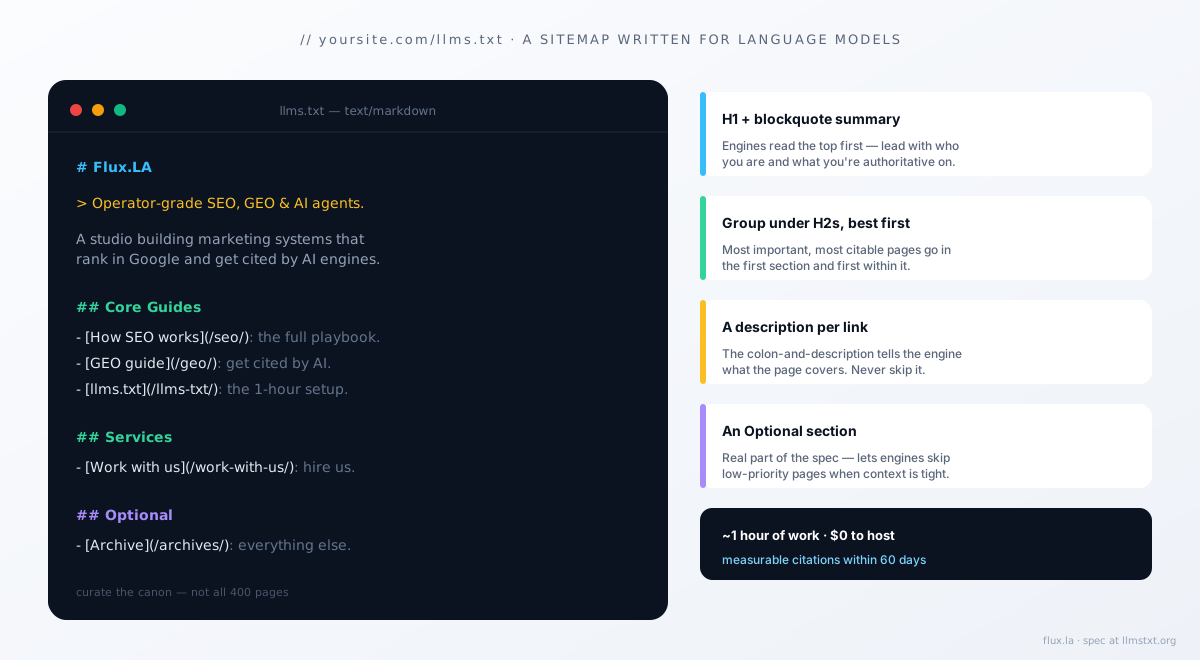
In our portfolio, sites that shipped llms.txt saw measurable AI citations appear within 60 days — from one hour of work and a file that costs nothing to host. There is no other GEO lever with that ratio.
The format, exactly
An llms.txt is Markdown with a specific shape. Here’s the skeleton:
# Your Site Name

> A one-sentence description of what your site is and who it's for.

A short paragraph of context — what you do, what topics you're
authoritative on, anything an engine should know to cite you correctly.

## Core Guides

- [How SEO works in 2026](https://yoursite.com/seo/): The full SEO + GEO playbook.
- [GEO complete guide](https://yoursite.com/generative-engine-optimization/): How to get cited by AI engines.

## Services

- [Work with us](https://yoursite.com/work-with-us/): How to hire the team.

## Optional

- [Archive](https://yoursite.com/archives/): Everything else.
The rules that matter:
- Start with an H1 of your site name, then a blockquote summary. Engines read the top first.
- Group links under H2 sections. Put your most important, most citable pages in the first section.
- Every link gets a colon-and-description. The description is what tells the engine what the page covers — don’t skip it.
- Use an
## Optionalsection for pages an engine can ignore when it’s short on context. This is a real part of the spec and helps engines prioritize.
llms-full.txt: the version that inlines content
llms-full.txt goes further: instead of just linking your key pages, it includes their full text in one file. The benefit is that an engine can ingest your best content in a single fetch, with no crawling and no risk of a JS-rendered page failing to load. The cost is that you have to regenerate it when content changes.
For a content-led site, llms-full.txt is worth it — it’s the difference between handing an engine a table of contents and handing it the book. Generate it from your content at build time so it never goes stale.
How to build yours in an hour
Step 1 (15 min): List your canonical pages. Your pillar guides, your service pages, your About page. Not every page — the 10-20 that represent what you want to be cited for. Curation is the point; a llms.txt that lists all 400 pages is no more useful than a raw sitemap.
Step 2 (20 min): Write a one-line description for each. This is the work. Each description should say plainly what the page covers and who it’s for. Write them the way you’d want an engine to summarize you.
Step 3 (10 min): Group and order. Most important section first, most important link first within each section. Put low-priority pages under ## Optional.
Step 4 (10 min): Generate it at the right path. It must be served at yoursite.com/llms.txt as text/plain or Markdown. On a static site, generate it at build time from your content so it updates automatically. On a CMS, a plugin or a small script works.
Step 5 (5 min): Verify. Load yoursite.com/llms.txt in a browser. Confirm it renders as plain text, all links resolve, and the descriptions are accurate.
Common mistakes
Listing everything. The value is curation. An llms.txt with 300 links tells the engine nothing about what matters. Keep it to your real canon.
No descriptions. A bare list of URLs throws away the entire point. The descriptions are what make the file useful.
Letting it go stale. A llms.txt that points to a redesigned URL structure, or describes pages you’ve since rewritten, actively misleads engines. Generate it from your live content so it can’t drift.
Treating it as a ranking trick. llms.txt doesn’t rank you in Google and won’t fix thin content. It makes good content easier to find and cite. If you don’t have content worth citing, build that first — see the GEO guide.
Does it actually work?
It’s an emerging standard, not a guarantee — not every engine respects it yet, and adoption is still uneven. But it’s cheap, it’s harmless when ignored, and the engines that do use it are exactly the ones sending the highest-converting traffic. The asymmetry is overwhelming: an hour of work for a real upside and zero downside. Ship it, then spend your remaining GEO effort on the content and schema that do the heavy lifting.
What we run for clients
Every GEO engagement ships an llms.txt and llms-full.txt generated at build time from the site’s content, so they update automatically and never drift. It’s part of the week-one technical pass alongside schema and crawlability.
If you want this set up on your site, tell us what you’re working on. Two slots open in Q3 2026.
Further reading
- Generative Engine Optimization: the complete guide — where llms.txt fits in the full program
- Answer Engine Optimization — the schema and entity work that pairs with it
- How SEO actually works in 2026 — the foundation underneath
One copyable AI agent, every Wednesday.
Flux founder Alejandro Rioja's weekly newsletter for operators: an agent he shipped that week, one growth experiment with real numbers, and what's working across SEO and GEO right now.
Free · 1-click unsubscribe · confirm by email and you're in.
Alejandro Rioja
Operator who builds and sells marketing-focused brands. Founder of Pickleland, founder of Flux.LA, writing about AI SEO + GEO at alejandrorioja.com.